Fanvil phones
Connect a Fanvil desk phone to a SIP device on your PBX, and set the tone, time zone and daylight saving.
You set up a Fanvil phone by entering the SIP details from a SIP device into the phone’s web interface. This guide uses a Fanvil V66 Pro; other models may look slightly different.
Before you start
Section titled “Before you start”- Add a SIP device to the person’s User under Device configuration, and click Apply configuration.
- Open Devices at the top of the PBX tab and select the device. Keep its SIP credentials open: Domain, Username and Password.
- Open the phone’s web interface by typing its IP address into your browser, and sign in.
The Domain shows the server address, a colon and the port.
If Transport protocol shows TLS, TLS encryption is on for your PBX. The port in the Domain is then different, and you must set the phone to use TLS instead of TCP, with SRTP (shown as Media encryption).
Register the phone
Section titled “Register the phone”-
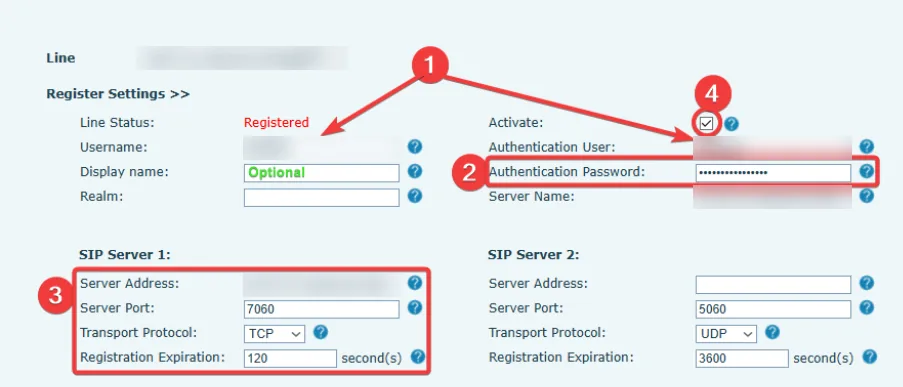
Open the line settings (Register Settings) for the first line.
-
Fill in:
Fanvil field What to enter Username The Username. Authentication User The Username. Authentication Password The Password. Server Address (under SIP Server 1) The part of the Domain before the colon. Server Port The number after the colon. Transport Protocol TCP. Registration Expiration 120 seconds. -
Make sure Activate is ticked, and click Apply.
Fix keypresses not being recognised
Section titled “Fix keypresses not being recognised”If menus don’t react when you press a number during a call, set the tones for your country:
- Go to Phone Settings › Tone.
- In Select Your Tone, choose your country.
- Click Apply.
Set the time zone and daylight saving
Section titled “Set the time zone and daylight saving”- Go to Phone Settings › Time/Date.
- Choose your Time zone.
- If your area has daylight saving, under Daylight Saving Time Settings, choose your location and set DST Set Type to Automatic.
Check it works
Section titled “Check it works”- Line Status shows Registered, and in PBX › Devices the SIP device shows Online.
- Make a test call and ask someone to call you.
If it doesn’t register, see Softphone errors. A device that tries to register with a wrong password is blocked, and the block lifts after 5 minutes.