Queue
Last updated View as Markdown (opens in a new tab)
Hold callers in line and keep ringing your team until someone answers.
A Queue rings a team of users and keeps callers waiting in line until someone answers. If nobody answers, it tries again after a short interval, and keeps going until the call is answered, the caller hangs up, or the maximum waiting time runs out.
Use a queue for a team that takes lots of calls, such as sales or support. For a small team where callers shouldn’t wait, use a Ring group instead.
Add it to your call flow
Section titled “Add it to your call flow”- Drag Queue from the Handling mass incoming calls group onto the canvas and click the gear icon.
- Enter a Name.
- Under Specify users to be called, click Add and choose the users.
- Choose a Ring mode and set the Maximum waiting time.
- Click Save.
- Connect the paths you need (see Call paths) and click Apply configuration.
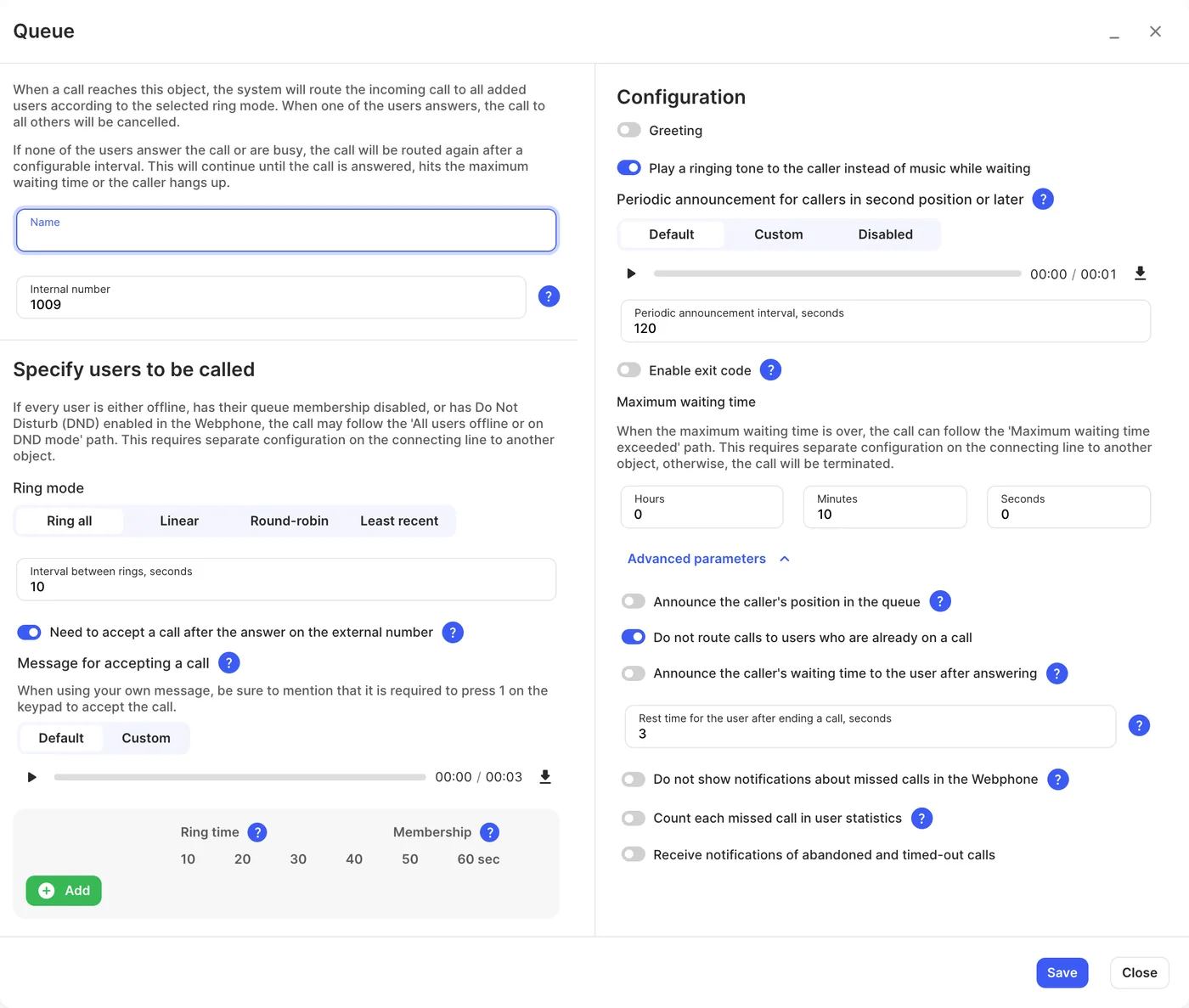
Users and ringing
Section titled “Users and ringing”| Setting | What it does |
|---|---|
| Name | Label on the canvas, in the Webphone and in reports. |
| Internal number | Users can dial it or transfer calls to the queue. |
| Ring mode | Ring all: rings all users at the same time until one answers. Linear: rings users one at a time, top to bottom, until one answers. Round-robin: like Linear, but starts from where it left off in the previous cycle. Least recent: rings the last called user repeatedly until they answer; once answered, the next call goes to the next user in the list. |
| Interval between rings, seconds | How long to wait before trying the users again after a round with no answer, 5 to 60 seconds. Must be shorter than the maximum waiting time. |
| Need to accept a call after the answer on the external number | Users answering on an external number must press 1 to accept. |
| Message for accepting a call | The prompt asking them to press 1 (Default or Custom). |
| Ring time | How long each user rings in each round, 10 to 60 seconds. If a user’s own ring time is shorter, their setting is used. |
| Membership | Turn a user off to stop queue calls reaching them without removing them. Users can also do this in the Webphone (see Queues and ring groups in the Webphone) unless it’s disabled on the User. |
Caller experience
Section titled “Caller experience”| Setting | What it does |
|---|---|
| Greeting | A message played when the caller enters the queue. |
| Play a ringing tone to the caller instead of music while waiting | Callers hear ringing instead of hold music. |
| Music on hold | Shown when the ringing tone is off: the music callers hear while waiting. Collections are set up in Settings › Music on hold. |
| Periodic announcement for callers in second position or later | A message repeated while callers wait (Default, Custom or Disabled). It isn’t played to the caller who is first in line. |
| Periodic announcement interval, seconds | How often the announcement repeats, 15 to 120 seconds. |
| Enable exit code | Callers can press a key to leave the queue, for example to go to voicemail. Adds an Exit code path. |
| Maximum waiting time | How long a caller can wait (hours, minutes, seconds). |
Advanced parameters
Section titled “Advanced parameters”| Setting | What it does |
|---|---|
| Announce the caller’s position in the queue | Tells callers in second place or later where they are in line. The first caller hears it at the start of each round. Set how often with Interval between position announcements, seconds (15 to 120). |
| Do not route calls to users who are already on a call | Skips users who are busy. |
| Announce the caller’s waiting time to the user after answering | Tells the user how long the caller waited before connecting them. |
| Rest time for the user after ending a call, seconds | A short break before the next call, 0 to 300 seconds. If a user gets calls from several Queue and Queue callback objects, the setting from the object they last answered applies. |
| Do not show notifications about missed calls in the Webphone | Hides missed-call alerts for queue calls. |
| Count each missed call in user statistics | Counts every unanswered ring as missed in Reports › User statistics, even when someone else answered. This can inflate missed-call figures. |
| Receive notifications of abandoned and timed-out calls | Emails you when callers hang up or time out. |
Call paths
Section titled “Call paths”| Path | When it’s used |
|---|---|
| Maximum waiting time exceeded | The caller waited longer than the maximum waiting time. |
| All users offline or on DND mode | Every user is offline, turned off in the queue, or on Do Not Disturb. A user with Webphone mobile, Microsoft Teams or an external number turned on always counts as online. |
| Exit code | Only when Enable exit code is on: the caller pressed the exit key. |
Connect these to Voicemail or a Queue callback. If Maximum waiting time exceeded isn’t connected, the call ends when the time runs out.