Order phone numbers
Buy a local phone number in the portal and add it to your call flow so it rings.
Buy a new local (geographic) number in Services › Phone numbers, then add it to an Inbound number in the PBX so calls reach your team. Every number can take several calls at the same time.
Before you start
Section titled “Before you start”- To keep a number you already have, port it instead of buying a new one.
- For other number types, see Toll-free numbers, Virtual mobile numbers and International numbers.
1. Order the number
Section titled “1. Order the number”- Go to Services › Phone numbers and open the Order new numbers tab.
- Choose the Country and Area, for example Australia and 618 - Adelaide, SA.
- Under Available numbers, tick the numbers you want. They move to Selected numbers.
- Check the monthly cost in Order summary. Services charged only for the rest of this month are marked, and Total due today for all services shows what you pay now. The Submit order button shows the same amount.
- Tick Agree to service terms and conditions and click Submit order.
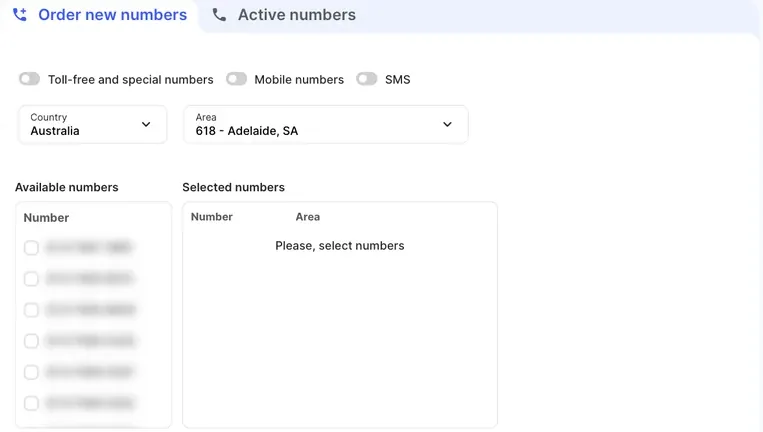 The toggles above the list (Toll-free and special numbers, Mobile numbers and SMS) filter the Country and Area lists to that kind of number. SMS shows only SMS-enabled numbers. Leave them off for local numbers.
If an area has run out of numbers, the portal offers to order more for you with Request numbers.
2. Add it to your call flow
Section titled “2. Add it to your call flow”- Go to the PBX tab and drag Inbound number onto the canvas.
- Click the gear icon and enter a Name, such as “Main line”.
- Under Available numbers, select your new number and click the right arrow to move it to Included numbers.
- Click Save.
- Connect the Inbound number to where calls should go, such as a User, Ring group or Time conditions.
- Click Apply configuration.
The red glow around the object disappears once it’s fully set up. Apply configuration can only be clicked when every object is complete.
Check it works
Section titled “Check it works”- The number appears on the Active numbers tab in Services › Phone numbers.
- Call it from a mobile. The phone or user you connected should ring.
If it doesn’t ring, see Phone not ringing.
Can’t find the number you want?
Section titled “Can’t find the number you want?”If there are no numbers for the city or country you need, the support team can order them for you. Raise a support ticket.
Australia only
For a specific number or pattern (for example, a number ending in 700), ask the support team for a manual number search and give them a few prefixes or patterns. A manual search fee applies, and it’s higher for a premium number. Ask the support team for a quote before the search. A match isn’t guaranteed, and the more specific the request, the less likely it is to be found.
Next steps
Section titled “Next steps”- Send SMS from your company name: SMS sender ID register.
- Build the rest of your call flow: Business hours, Phone menu.