BLF and speed dial keys
Set up keys on a Yealink phone that show whether colleagues are busy, or call a number with one press.
Yealink phones have keys beside the screen (DSS or line keys) that you can program:
- A BLF (busy lamp field) key watches a colleague. Its light is green when they’re free and red when they’re on a call. Press it to call them, or to transfer a call to them.
- A speed dial key calls a saved number, such as a supplier or another office.
This guide sets keys in the phone’s web interface. For auto-provisioned phones you can set them from the PBX instead; see BLF and speed dial keys in the advanced settings. Screens differ a little between models and firmware.
Before you start
Section titled “Before you start”- The phone is set up and online in PBX › Devices.
- For a BLF key, the colleague’s internal number. It’s in their User settings.
- The phone’s IP address (press OK on the phone) and web interface password. The default username and password are both
admin. On an auto-provisioned phone, set the passwords in the SIP device’s Yealink settings instead of on the phone.
- Type the phone’s IP address into a web browser and sign in.
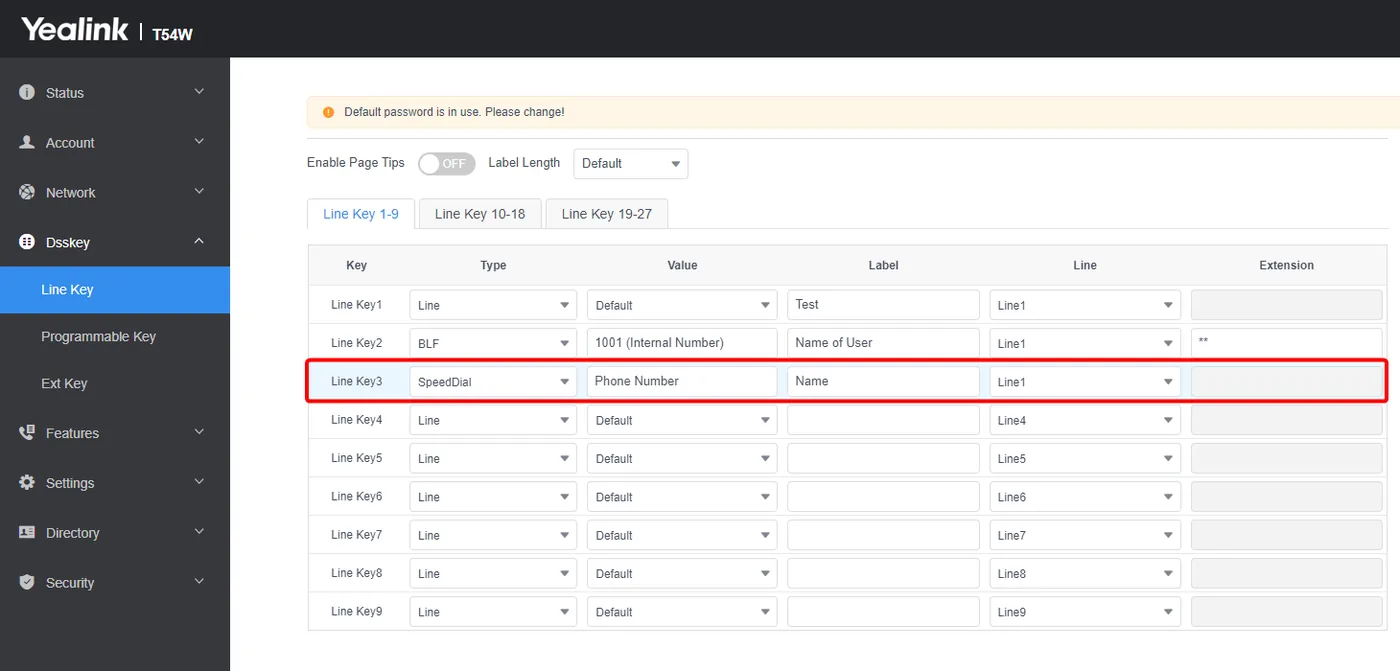
- Go to Dsskey › Line Key. On an auto-provisioned phone, Line Key1 is already set to your line; leave it as it is.
- Choose a free key and fill in its row:
| Field | BLF key | Speed dial key |
|---|---|---|
| Type | BLF | SpeedDial |
| Value | The colleague’s internal number | The phone number to call |
| Label | Their name, shown next to the key | A name for the number |
| Line | Line1 | Line1 |
| Extension | Optional: a pickup code (see below) | Leave empty |
- Click Confirm. The key appears on the phone straight away.
Australia only
For a speed dial to a landline in another state, include the area code, for example 02 or 07.
Answer a colleague’s ringing phone
Section titled “Answer a colleague’s ringing phone”Enter ** in Extension on a BLF key. When the colleague’s phone rings, press the key to answer their call on your phone. Dialling ** followed by their internal number does the same.
To let a group of people answer each other’s calls, you can also use Pickup groups.
Check it works
Section titled “Check it works”- The BLF key’s light turns red while the colleague is on a call, and green again when they hang up.
- Pressing the speed dial key calls the saved number.
If a BLF key stays unlit, check the internal number and that both phones are online.
More key ideas
Section titled “More key ideas”- A BLF key for a Call flow control object’s BLF code shows whether your day/night switch is on, and switches it with one press.
- A BLF key for a Voicemail box’s internal number shows when there are new messages.
- Paging keys: see Paging.