Call history
Last updated View as Markdown (opens in a new tab)
List every call in a period, find a specific call, and export or email the list.
Call history lists every call on your account for the period you choose, one row per call. Use it to find a specific call, check who called whom, or export the list for your records. For totals and charts, use the Overview report instead.
Find calls
Section titled “Find calls”- Go to Reports › Call history.
- Choose the dates in the date range picker. To include only certain hours, drag the Time range: slider.
- Click Filter to narrow the list further, then click Apply. Reset clears the filters.
- Choose Total calls, Inbound or Outbound.
You can choose dates within the last six months. For older calls, contact the support team.
The Filter window has these fields:
| Field | What it filters |
|---|---|
| Time range | Times of day. Shown here only on a tablet or phone; on a computer, use the Time range: slider on the page. |
| Subaccount | One or more accounts. |
| Call type | Inbound or outbound calls. |
| Call status | Answered, or missed and not answered calls. |
| Phonebook contact | Calls to or from contacts in a phonebook. |
| Phone number | An Inbound number or caller ID. |
| Caller ID | One or more calling numbers. |
| Dialed number | One or more called numbers. |
| Terminate cause | How the call ended. |
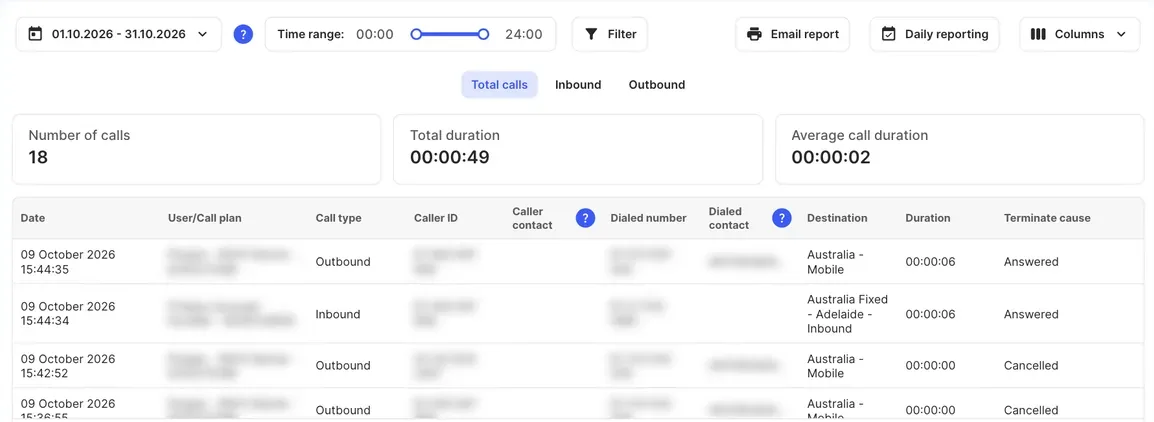
The three boxes above the list show the Number of calls, Total duration and Average call duration for the calls that match.
Columns
Section titled “Columns”| Column | What it shows |
|---|---|
| Date | When the call started. |
| User/Call plan | For outbound calls, the user, their call plan and subaccount. For inbound calls, the account the number belongs to. |
| Call type | Inbound or Outbound. |
| Caller ID | The number the call came from. |
| Caller contact | The caller’s name, if their number is saved in a Global phonebook in the PBX. |
| Dialed number | The number that was called. |
| Dialed contact | The called party’s name, if their number is saved in a Global phonebook in the PBX. |
| Destination | The type and location of the called number, for example Australia - Mobile. |
| Duration | Length of the call (hh:mm:ss). |
| Terminate cause | How the call ended, for example Answered or Cancelled. |
Use Columns to hide columns you don’t need.
Export the list
Section titled “Export the list”- Click Email report to get the list, with your filters applied, as a CSV file by email. Choose the recipients under Administrators or Email, then click Send. You can send one request every ten minutes.
- Click Daily reporting to have a report emailed to chosen administrators every day. See Reports overview.
- Set your filters before you export. The export contains only the calls that match.
- For a list of one queue’s answered, abandoned or timed-out calls, use the download buttons in Queue statistics.
Related
Section titled “Related”- Call recordings
- User statistics
- API: get the same call data from your own software.