Call recording storage
Keep call recordings in the cloud, choose a storage plan and set when old recordings are deleted.
Call recording storage keeps your call recordings in the cloud, so you can search, play, download and delete them in the portal. You pay a monthly fee based on how many minutes of recordings you store. Open it from Services › Call recording.
Stored recordings appear in two places:
- Reports › Call recordings, for everyone with access to reports. See Call recordings.
- The Webphone call History, for users whose User object saves recordings to cloud storage. Users only see their own recordings.
Turn on cloud storage
Section titled “Turn on cloud storage”- Go to Services › Call recording.
- Under Storage plans, choose a plan.
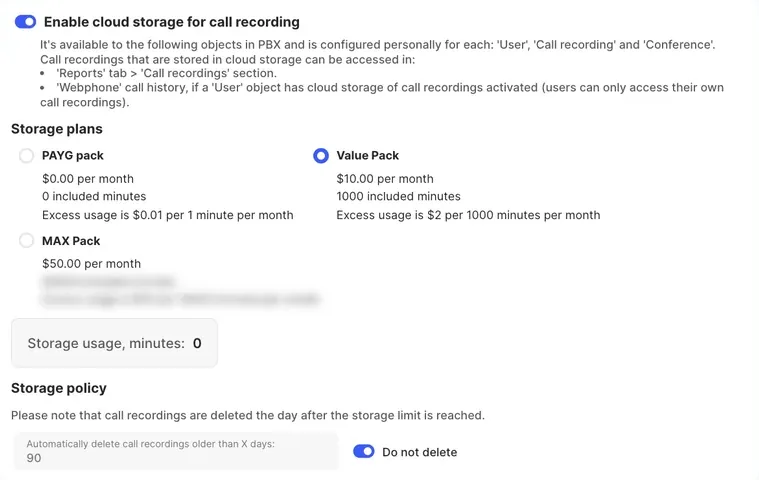
- Turn on Enable cloud storage for call recording. You can’t turn it on until you’ve chosen a plan.
- Tick Agree to service terms and conditions and click Submit order.
The menu item then shows Cloud storage enabled.
Storage plans
Section titled “Storage plans”| Plan | How it’s charged |
|---|---|
| PAYG pack | No monthly fee and no included minutes. You pay per minute stored. |
| Value Pack | A monthly fee with a block of included minutes. Extra minutes are charged per 1000. |
| MAX Pack | A higher monthly fee with more included minutes. |
The page shows the current price, included minutes and excess usage rate for each plan. Storage usage, minutes shows how many minutes you’re storing now.
Storage policy
Section titled “Storage policy”| Setting | What it does |
|---|---|
| Automatically delete call recordings older than X days | Deletes recordings once they reach this age. Enter a whole number of days, 1 or more. |
| Do not delete | Keeps recordings until you delete them. |
Storage policy changes save automatically. You can change them only while cloud storage is turned on.
Turn off cloud storage
Section titled “Turn off cloud storage”Turn off Enable cloud storage for call recording and submit the order.
Record calls into storage
Section titled “Record calls into storage”Storage only keeps recordings. To make them, turn on cloud storage in the PBX objects that record calls:
- User: turn on Save recordings to the cloud storage, then choose Automatically record all incoming calls and/or Automatically record all outgoing calls. Without automatic recording, users record on demand: the record button in the Webphone, or #1 to start and #0 to stop on other phones.
- Call recording: records every call that passes through it.
- Conference: records conference calls.
Click Apply configuration after changing the call flow.