Monthly call volume
Last updated View as Markdown (opens in a new tab)
Compare inbound and outbound calls month by month over the last six months.
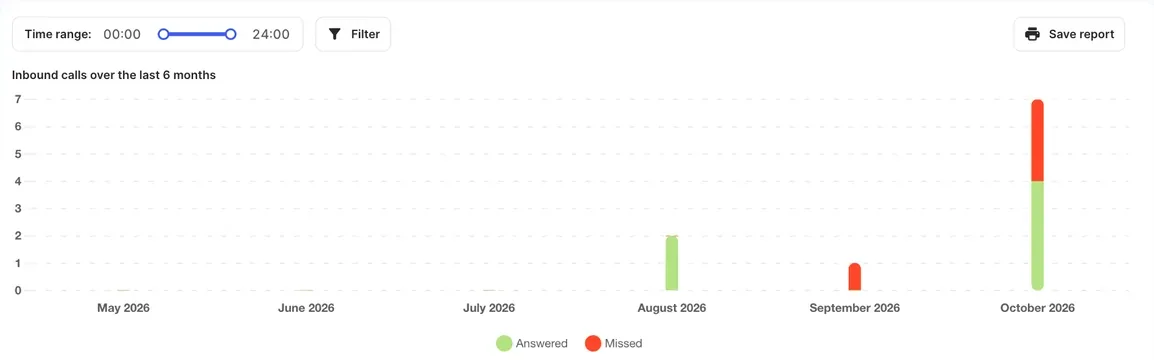
Monthly call volume shows your calls for each of the last six months, with inbound and outbound calls kept separate. Use it to spot trends, such as a busy season or a drop in missed calls. For a specific month or day, use the Overview or Call history report instead.
Run the report
Section titled “Run the report”- Go to Reports › Monthly call volume. The report always covers the last six months.
- To include only certain hours, drag the Time range: slider.
- Click Filter to narrow the report by user (Subaccount), Phonebook contact, Phone number, Caller ID or Dialed number, then click Apply. For outbound calls, the phone number is the caller ID that was used.
What it shows
Section titled “What it shows”Two charts, Inbound calls over the last 6 months and Outbound calls over the last 6 months, each with a table below.
| Column | Inbound calls | Outbound calls |
|---|---|---|
| Month | The month. | The month. |
| Total duration | Time spent on inbound calls. | Time spent on outbound calls. |
| Average duration | Average length of an inbound call. | Average length of an outbound call. |
| Answered | Calls your team answered. | Calls the other party answered. |
| Missed / Not answered | Missed: calls nobody answered. | Not answered: calls the other party didn’t answer. |
| Total | All inbound calls. | All outbound calls. |
Save the report
Section titled “Save the report”Click Save report to save it, with your filters applied, as a PDF.