Stop ghost calls on Yealink phones
Stop a Yealink phone ringing with calls from unknown short numbers or IP addresses that have no one on the line.
Symptom
Section titled “Symptom”The phone rings, often at night, with calls from short numbers such as 100 or 1000, or from an IP address. When you answer, nobody is there.
Likely cause
Section titled “Likely cause”These calls come from SIP scanners: programs that probe the internet for phones and adapters with weak security. They don’t come through the PBX: they reach the phone directly, because the phone accepts direct IP calls by default.
Set the phone to accept calls only from its own SIP server:
- Type the phone’s IP address into a web browser (press OK on the phone to see it) and sign in. The default username and password are both
admin. - Go to Features › General Information and scroll down.
- Turn Allow IP Call off.
- Turn Accept SIP Trust Server Only on.
- Click Confirm.
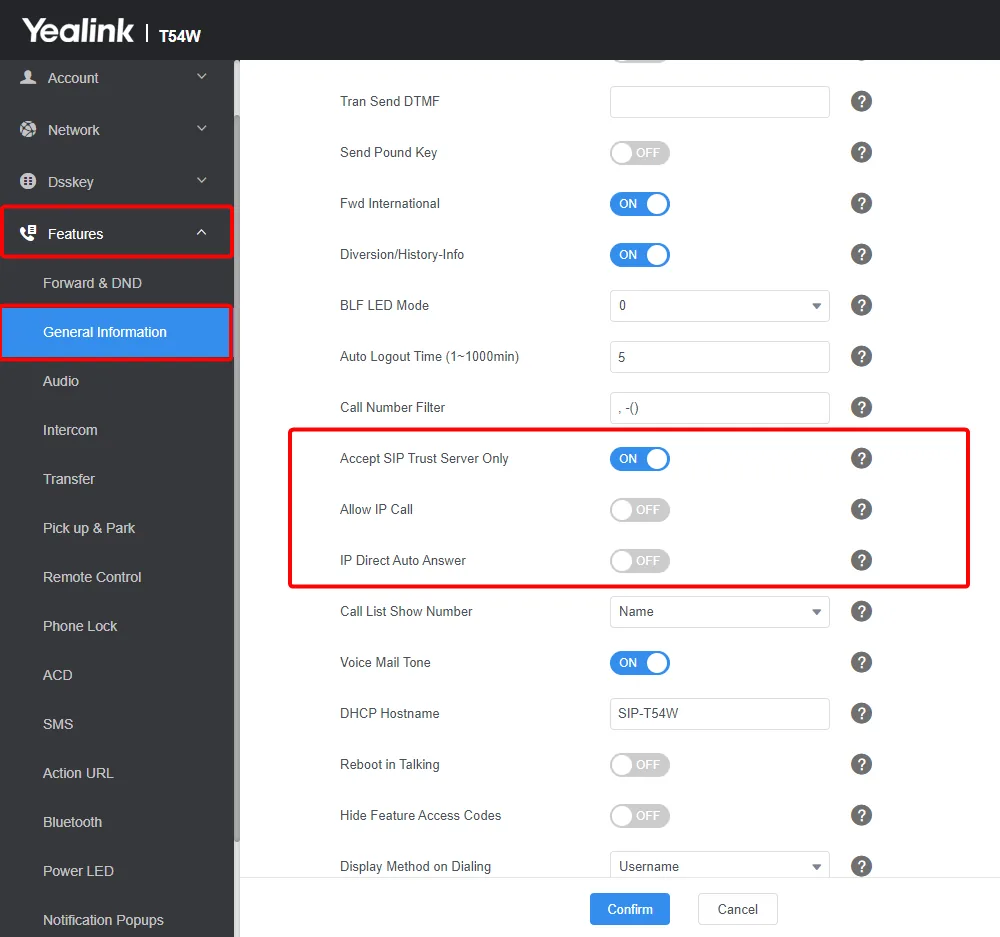
The phone still makes and receives normal calls through the PBX. Auto-provisioned phones get both settings from the PBX, so they shouldn’t need this change.
Also check
Section titled “Also check”- Change the phone’s web interface password from the default
admin. On an auto-provisioned phone, set it with Replace default Yealink web portal passwords (recommended) in the SIP device’s Yealink settings. - Check your network setup against Network requirements.
When to contact support
Section titled “When to contact support”If ghost calls continue after these changes, open a support ticket with the times of the calls and the numbers shown.