Check call and SMS rates
Look up what a call or SMS to any destination costs on your plan, or get the full rate list.
Use Billing › Rates search to find out what an outbound call or SMS costs on your plan, before you make it.
Before you start
Section titled “Before you start”Know which call plan or SMS plan you want to check. Your plans are listed in Services › PBX licences and under Active subscriptions in Account details.
Check a call rate
Section titled “Check a call rate”- Go to Billing › Rates search. The Outbound call rates tab opens.
- In Prefix, enter the start of the number you want to call in E.164 format: country code first, digits only, with no + and no leading zero. For example,
614for Australian mobiles or447for UK mobiles. - Optionally, choose the Caller ID you’ll call from. Then choose the Call plan.
- Click Search.
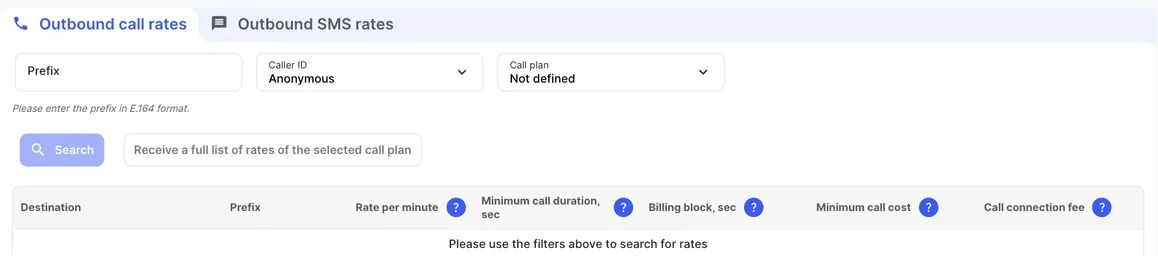
| Column | What it shows |
|---|---|
| Destination | The country and type of number, for example “Australia - Mobile”. |
| Prefix | The number prefix the rate applies to. |
| Rate per minute | The cost of each minute (60 seconds) of the call. |
| Minimum call duration, sec | Every connected call is charged for at least this many seconds. For example, with 60 seconds, a 20-second call is charged as 60 seconds. |
| Billing block, sec | The call is charged in blocks of this many seconds. With 60 seconds, a call of 2 minutes 5 seconds is charged as 3 minutes. With 1 second, it’s charged as 125 seconds. |
| Minimum call cost | The lowest amount charged for any connected call. |
| Call connection fee | A fixed amount added to the cost of each connected call. |
Check an SMS rate
Section titled “Check an SMS rate”- Open the Outbound SMS rates tab.
- Enter the Prefix in E.164 format and choose the SMS plan.
- Click Search.
The result shows the Destination, Prefix and Rate per SMS part. One part holds 160 characters of Latin letters and digits, or 70 characters if the message has any non-Latin character. A longer message is split into parts of 153 (or 67) characters, and each part is charged as one SMS.
Get the full rate list
Section titled “Get the full rate list”- Choose a plan, then click Receive a full list of rates of the selected call plan (or Receive a full list of rates of the selected SMS plan on the SMS tab). On a phone, the button is Email full ratelist.
- Under Administrators, select who gets the list, or add addresses under Email.
- Click Send.
The full list is emailed as a CSV file, usually within 5 minutes. You can request it once every ten minutes.
Check it works
Section titled “Check it works”After a call, compare its cost in Call charges history on Account balance with the rate you looked up.