Low balance notifications
Get an email when your prepaid balance falls below an amount you choose.
Get an email as soon as your balance drops below an amount you set, so you can top up before your service is interrupted. Low balance emails are available on prepaid accounts. The balance is checked every 60 seconds.
Before you start
Section titled “Before you start”You need access to the Billing tab.
Set up notifications
Section titled “Set up notifications”-
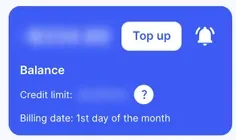
Go to Billing › Home and click the bell icon next to Top up in the Balance box. You can also click Balance notifications on Billing › Account balance.
-
In the Balance notifications window, turn on Low balance notifications.
-
In When the balance gets lower, enter the balance amount that should trigger the email. It must be greater than your credit limit, which is shown in the window.
-
In Send low balance notifications to, enter the email address to notify. You can add more than one.
-
Click Apply.
The same window has Expected monthly fees notifications. Turn it on to be warned in advance if your balance after the next recurring fees would be close to or below your credit limit. That warning goes to the administrators who receive invoice and receipt emails.
On a postpaid account, the window shows only Credit limit warning notifications. Turn it on to be warned by email when your balance gets close to your credit limit. The system works out when to warn you from your usage patterns, so there’s no amount to set.
Check it works
Section titled “Check it works”Within about 60 seconds of your balance dropping below the amount you set, a low balance warning is emailed to every address you entered.
If no email arrives, check your spam folder and the addresses you entered.
Next steps
Section titled “Next steps”- Set up auto top-up so your balance refills on its own.
- Payment methods and top-ups