Queue callback
Last updated View as Markdown (opens in a new tab)
Let callers leave their number instead of waiting, and call them back when a user is free.
Queue callback lets callers leave a phone number instead of waiting on hold. The system then rings your users; when one answers, it calls the customer back and connects them.
It’s often connected to a Queue’s Exit code or Maximum waiting time exceeded path, so callers who don’t want to wait can ask for a callback.
Add it to your call flow
Section titled “Add it to your call flow”- Drag Queue callback from the Handling mass incoming calls group onto the canvas and click the gear icon.
- Enter a Name, then click Add and choose the users who will make callbacks.
- Choose the Ring mode and a Callback caller ID.
- Click Save, connect the object that should offer callbacks, and click Apply configuration.
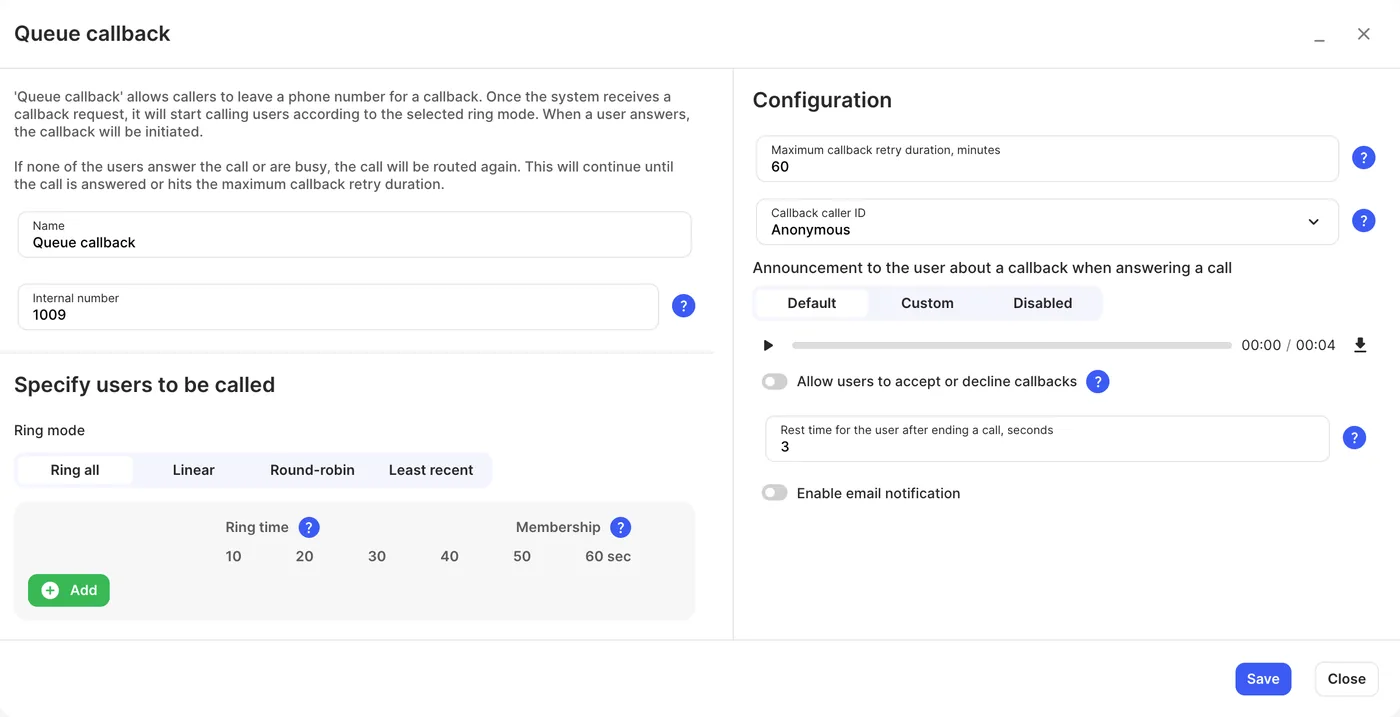
Settings
Section titled “Settings”| Setting | What it does |
|---|---|
| Name | Label on the canvas. |
| Internal number | Users can dial or transfer calls to it. |
| Ring mode | Ring all: all users at once. Linear: one at a time, top to bottom. Round-robin: like Linear, starting from where it left off last time. Least recent: the last called user repeatedly until they answer, then the next user for the next call. |
| Ring time | How long each user rings. If a user’s own ring time is shorter, their own setting is used. |
| Membership | Turn a user off to stop callbacks reaching them. |
| Maximum callback retry duration, minutes | How long the system keeps ringing users before giving up on a callback request, 1 to 480 minutes. |
| Callback caller ID | The number the customer sees when you call back. Only your purchased numbers (not toll-free or shared cost). With none, callbacks are anonymous. |
| Announcement to the user about a callback when answering a call | Tells the user it’s a callback before connecting (Default, Custom or Disabled). |
| Allow users to accept or decline callbacks | Asks the user to accept or decline. A declined callback isn’t retried; you can get an email when it happens. |
| Rest time for the user after ending a call, seconds | A short break before the next call, 0 to 300 seconds. If a user gets calls from several Queue and Queue callback objects, the value of the object whose call they answered last applies. |
| Enable email notification | Emails you when the maximum callback retry duration runs out, or when a user declines a callback (needs Allow users to accept or decline callbacks). |