Dial plans
Let users dial local numbers without the area code.
A dial plan is a set of rules that turns a number dialled in local format into full international (E.164) format. It means users can dial a local number without the area code.
Open Settings › Dial plans on the PBX tab. The default dial plan (marked with a star) is used PBX-wide and for new users. Individual users can have their own in their User settings.
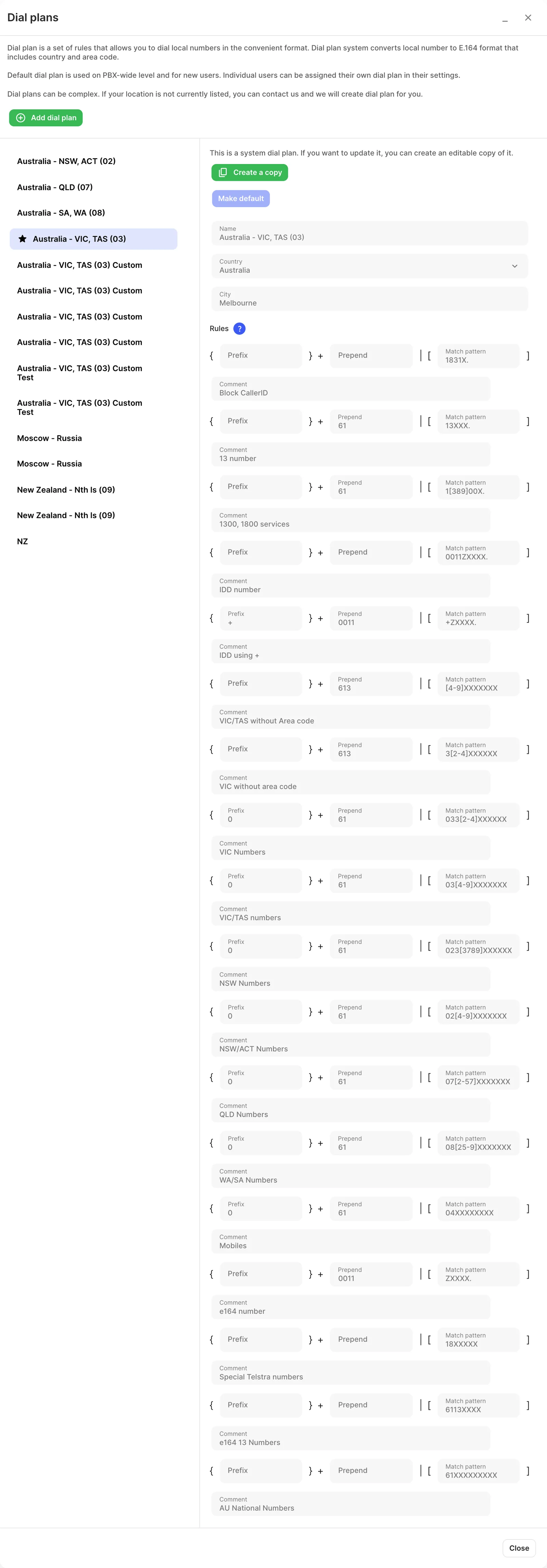
Built-in dial plans cover the Australian area codes (02), (03), (07) and (08). For example, with the dial plan for NSW and the ACT (02), dialling the 8-digit Sydney number 8888 7777 adds 612 in front automatically.
Create or change a dial plan
Section titled “Create or change a dial plan”Built-in (system) dial plans can’t be edited. To change one, select it and click Create a copy, then edit the copy. To start from scratch, click Add dial plan and set its Name, Country, City and Rules. Click Make default to make a plan the PBX default. If you delete a dial plan that users have, they switch to the default dial plan. If your location isn’t listed, contact support and they can create one.
Each rule has three parts, matched against the dialled number:
| Part | What it does |
|---|---|
| Prefix | Removed from the number when the rule matches. |
| Prepend | Added to the front of the number when the rule matches. |
| Match pattern | The pattern the rest of the number must match. Only the part matching this pattern (plus anything prepended) is dialled. |
| Comment | An optional note about the rule. |
Special symbols in a match pattern:
| Symbol | Matches |
|---|---|
X |
Any digit 0–9 |
Z |
Any digit 1–9 |
N |
Any digit 2–9 |
[1237-9] |
Any one of the listed digits |
. |
One or more remaining digits |