Spend tools
Track what you spend, get alerts before you run out of credit, and protect your account from unexpected charges.
Spend tools help you see what you’re spending and stop costs getting out of hand. They’re free and available to every customer in the portal.
What you can do
Section titled “What you can do”| Tool | Where | What it gives you |
|---|---|---|
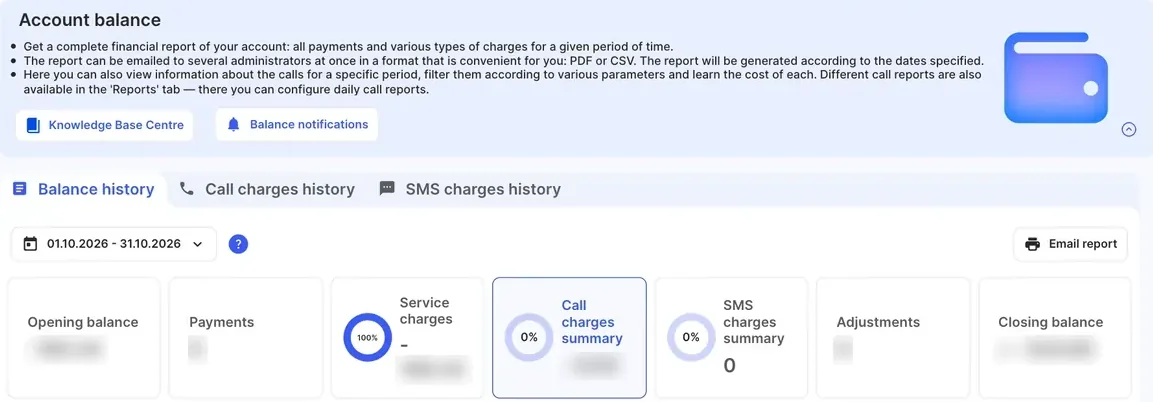
| Balance history | Billing › Account balance › Balance history | Opening and closing balance, payments, service charges, call and SMS charges, and adjustments for any date range. |
| Call charges history | Billing › Account balance › Call charges history | Every call with its cost. |
| SMS charges history | Billing › Account balance › SMS charges history | Every SMS with its cost. |
| Usage report | Billing › Account balance › Email report | A report for the dates you choose, emailed as PDF or CSV. You can send it to several administrators. |
| Monthly usage report | Emailed automatically | A PDF summary at the start of each billing cycle. |
| Balance notifications | Billing › Account balance › Balance notifications | Email alerts when your balance runs low or you near your credit limit. |
Usage data is updated in real time, or as close to it as possible.
How spending limits work
Section titled “How spending limits work”How your spending is limited depends on your account type. See Prepaid and postpaid.
Postpaid accounts
Section titled “Postpaid accounts”- Each postpaid account has a credit limit, based on its security deposit.
- You can’t spend more than the credit limit.
- You can get an email warning before your balance reaches the credit limit. You choose whether to get it (see Set up balance alerts). The system works out when to warn you from your usage patterns, so there’s no amount to set.
- To raise the credit limit, increase your security deposit.
Prepaid accounts
Section titled “Prepaid accounts”- Prepaid accounts are paid in advance: you top up to add credit.
- By default, outgoing calls and outgoing SMS stop when your balance reaches $0, until you top up. Monthly fees are still charged to your balance.
- If the support team has set a credit limit for your account, it’s shown as Credit limit: in the Balance notifications window. They then stop when your balance falls to minus that limit (for example, −$10 with a $10 credit limit).
- A call already in progress when the balance runs out finishes normally. Only new calls are blocked.
Monthly usage report
Section titled “Monthly usage report”At the start of each billing cycle (a calendar month), you get a PDF usage report by email. It shows:
- Total usage (calls and SMS)
- Total service and subscription charges for the period
- Opening balance (at the start of the period) and closing balance (current balance)
Postpaid customers get the report attached to their monthly invoice. Prepaid customers get the report too, but invoices are only issued for top-ups.
Set up balance alerts
Section titled “Set up balance alerts”You get email alerts automatically when:
- a prepaid balance is running low, or
- a postpaid balance is close to the credit limit, if Credit limit warning notifications is on.
To change them:
- Go to Billing › Account balance.
- Click Balance notifications.
- On a prepaid account:
- Turn Low balance notifications on or off.
- In When the balance gets lower, enter the amount. It must be above the lowest balance your credit limit allows.
- In Send low balance notifications to, enter the email addresses that get the alerts.
- Optionally turn on Expected monthly fees notifications, to be warned in advance if your balance after monthly fees will be lower than or close to your credit limit.
- On a postpaid account, turn Credit limit warning notifications on or off. The system decides when to warn you, based on your usage patterns, so there’s no amount to set.
- Click Apply.
For example, if you set the threshold to $15, you get an alert as soon as your prepaid balance falls below $15. See Low balance notifications for details.
Protect yourself from toll fraud
Section titled “Protect yourself from toll fraud”Toll fraud is when someone gets into a phone system and makes expensive calls, usually to international or premium numbers. The charges land on your account. These steps make it much harder:
- Use strong SIP passwords. Keep the generated passwords, and never share them or send them by email. If one may have leaked, click Generate a new password on the device in Devices, then apply the configuration.
- Lock SIP devices and trunks to your IP address. Turn on Allow connection from one IP address only in the device’s Advanced parameters or in the SIP trunk settings.
- Block international calls you don’t make. Calls to high-risk destinations are blocked by default. Ask the support team to block other destinations you don’t need. See International restrictions.
- Turn on 2FA for every portal administrator. See Two-factor authentication.
- Keep balance notifications on, so an unexpected run of charges reaches you quickly.
If you see calls you didn’t make, follow After a security incident.
Get help
Section titled “Get help”If you have questions about spend tools, usage reports or notifications, contact the support team.
If you need help to contact the support team:
- Deaf, hard of hearing or speech impairment: use the National Relay Service (NRS) on 1800 555 660.
- Speech-to-speech relay: call 1300 555 727.
- Another language: use the Translating and Interpreting Service (TIS National). Find their phone numbers at tisnational.gov.au.