Microsoft Teams direct routing
Make and receive phone calls in Microsoft Teams through your PBX, and what you need before you start.
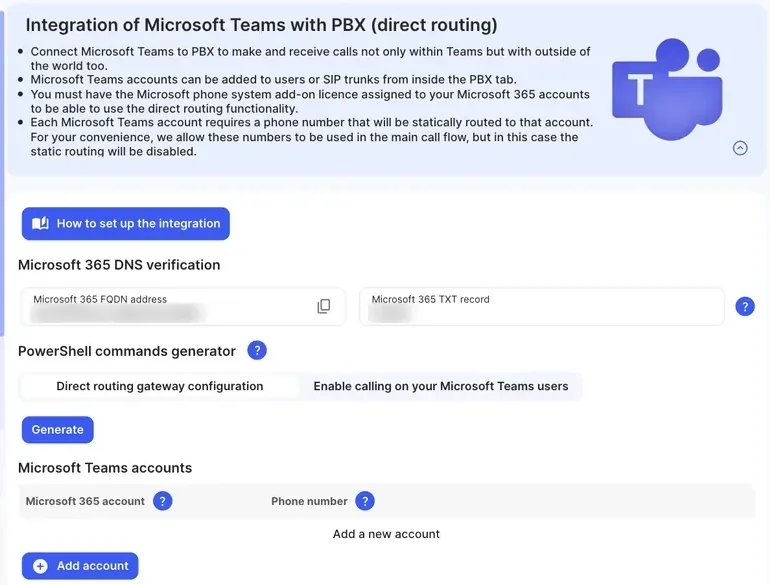
Direct routing connects Microsoft Teams to your PBX. Your people can then call any phone number from the Teams app and take calls to your business numbers in Teams, with the same call flow as everyone else.
You set it up in three places: the Microsoft 365 admin centre, the portal (Services › Microsoft Teams, Direct routing tab), and the PBX tab. A few commands are also run in Microsoft Teams PowerShell. The portal page’s other tab, SMS to MS Teams, is for SMS in Teams, which doesn’t need direct routing.
What you need
Section titled “What you need”| You need | Why |
|---|---|
| A Microsoft 365 global administrator | To add a domain, create a user and run PowerShell commands in your Microsoft 365 tenant. |
| The Microsoft phone system add-on licence (Teams Phone Standard) on each Teams user | Microsoft only allows direct routing for users with this licence. Some plans, such as Office 365 E5 and Microsoft 365 E5, usually include it. Microsoft renames its licences from time to time. |
| One phone number per Teams account | Each Teams account added in the portal gets its own number. Calls to that number go straight to that account. |
| A way to connect each Teams account in the PBX | A User with a Microsoft Teams device, or a SIP trunk in Microsoft Teams gateway mode. Both need a call plan for outgoing calls. |
| A computer with Windows PowerShell | To run the setup commands. PowerShell 5.1 works best. |
Two ways to connect Teams
Section titled “Two ways to connect Teams”| Option | How calls are handled | Best for |
|---|---|---|
| User with a Microsoft Teams device | Your PBX call flow decides where calls go. Teams rings like any other device, alongside the Webphone or a desk phone. | Using queues, ring groups, voice menus, voicemail and call recording in the PBX. |
| SIP trunk in Microsoft Teams gateway mode | The PBX passes calls to Microsoft Teams, and Teams’ own phone system routes them. | Businesses that build their call handling in Teams (Teams call queues and auto attendants). |
See Connect Teams users in the PBX for both.
About the Teams phone numbers
Section titled “About the Teams phone numbers”Each Teams account’s number is statically routed: calls to it go directly to that Teams account. You can also use the number in your main call flow, in an Inbound number. When you do, the static routing is turned off and the call flow decides where the call goes.
Set-up order
Section titled “Set-up order”- Set up direct routing: Microsoft 365 licences and domain, the portal, and the PowerShell commands.
- Connect Teams users in the PBX.
- Turn off Teams voicemail, so missed calls follow your PBX call flow.
Where to go next
Section titled “Where to go next”- Add more Teams users to an existing setup.
- Troubleshoot Microsoft Teams for PowerShell errors and calls that don’t ring.
- Send and receive SMS in Teams.
- Teams audio conferencing.