Order an internet connection
Last updated View as Markdown (opens in a new tab)
Check availability at your address and apply for a business internet plan built for VoIP calls.
You can order business internet from Services › Internet. The connections are set up to work well with VoIP calls.
| Feature | Details |
|---|---|
| Contract | Month to month, no lock-in. |
| Data | Unlimited download and upload. |
| IP address | A static public IP address with every connection. |
| Support | Based in Australia. |
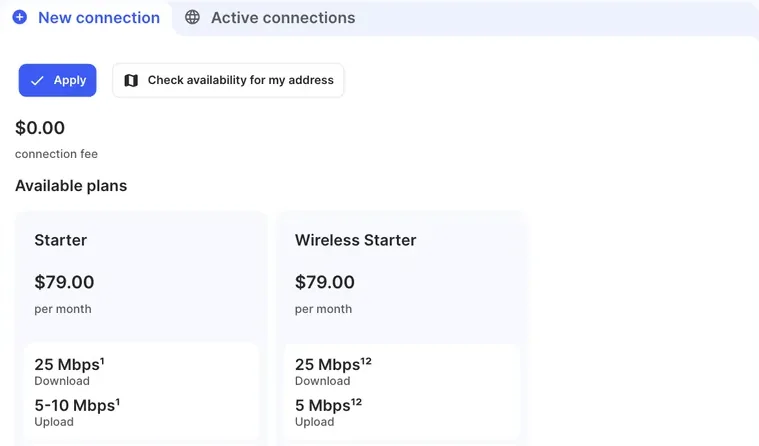
The page lists the available plans, such as Starter, Essential and Ultra, including wireless plans. Each plan shows its monthly price, download and upload speeds and typical busy speed. The connection fee is shown above the plans. Plan speeds depend on the NBN technology at your address and other conditions.
Before you start
Section titled “Before you start”- Internet can’t be ordered on a trial account. Activate your account first. See Your free trial.
- Have the full address of the premises where you need the connection.
Apply for a connection
Section titled “Apply for a connection”- Go to Services › Internet and open the New connection tab.
- Click Check availability for my address. Your provider’s address check opens. Enter the premises address there.
- Compare the Available plans.
- Click Apply and follow the application steps on the page that opens.
If you need help with your address or the application, contact the support team.
Check it works
Section titled “Check it works”Once the connection is active, it appears on the Active connections tab with its AVC ID, Service address and Service start date.
Next steps
Section titled “Next steps”- Network requirements for phones on your network.
- NBN connection issues