Webhooks
Send call events from your whole PBX to your own server as they happen, with a reference of every trigger and field.
Webhooks send details of calls to your server the moment something happens: a call starts ringing, is answered, ends, or leaves a voicemail. Use them to log calls in a CRM, pop up caller details, or start an automation. You set them up once in Integrations › Webhooks, and they work for every user, queue and ring group in the PBX.
Webhooks or the Webhook object?
Section titled “Webhooks or the Webhook object?”| Integrations › Webhooks | Webhook object in the PBX | |
|---|---|---|
| Scope | The whole PBX: all users, queues and ring groups. | One point in one call flow. |
| When it’s sent | On the events (triggers) you tick, such as answered or completed calls. | When an inbound call passes through the object. |
| Payload | Detailed, depending on the trigger. | A short webhook_component_event payload. |
| Custom headers | No. | Yes. |
| Use it for | Logging every call, CRM integrations. | Notifying a system about one route, such as calls that time out of a queue. |
To ask your server where to send a call, use the API request object. To fetch call lists on demand, use the API.
Before you start
Section titled “Before you start”- Webhooks need the Integrations licence: Services › PBX licences › Advanced features. Without it, you can set up endpoints and triggers, but nothing is sent. See Integrations overview.
- You need a URL on your server that accepts
POSTrequests with a JSON body and answers within 15 seconds. If your server doesn’t answer with a success status, the PBX tries again a few times, then drops the event.
Add an endpoint
Section titled “Add an endpoint”An endpoint is the address webhooks are sent to. You can add several, each with its own triggers.
- Go to Integrations › Webhooks.
- Under Endpoints, click Add.
- Enter a Webhook endpoint name and the URL of your server.
- Enter a Secret token: any string you choose. It’s sent with every request so your server can check the request is genuine.
- Optional: choose a Default agent. In Queue call summary and Ring group call summary events that nobody answered, this user’s name and number are filled in.
- Click Save.
- Under Triggers, tick the events you want for this endpoint, then click Save.
You can’t add, edit or delete endpoints, or save triggers, while the PBX has changes that aren’t applied yet. The page then shows Please first apply the call flow configuration in the PBX tab. Go to the PBX tab and click Apply configuration, then come back.
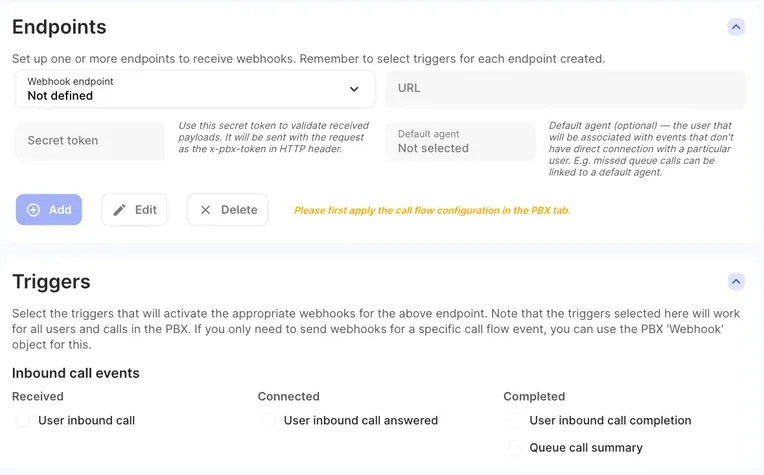
To change or remove an endpoint, choose it in Webhook endpoint and click Edit or Delete.
On the Triggers card, the inbound triggers are grouped under Inbound call events and the outbound ones under Outbound call events.
Test it
Section titled “Test it”- Under Webhook examples, choose a trigger in Webhook trigger. The example payload and a description of each field appear below.
- Click Test this webhook to send that example to your endpoint.
- Then make a real call that matches a trigger you ticked, and check that your server receives it.
If you don’t have a server yet, a free request-inspection service such as webhook.site gives you a temporary URL to paste into URL, so you can see what arrives.
Check that a request is genuine
Section titled “Check that a request is genuine”Every webhook carries your secret token in the x-pbx-token HTTP header. Compare it with the token you entered and ignore requests that don’t match.
Triggers
Section titled “Triggers”| Trigger | type value |
Sent when |
|---|---|---|
| User inbound call | user_inbound |
An inbound call reaches a User and starts ringing. If the call came through a queue or ring group, its name is included. |
| User inbound call answered | user_inbound_answered |
A user answers an inbound call. |
| User inbound call completion | user_inbound_completed |
An inbound call to a user ends. |
| Queue call summary | queue_call |
A call delivered through a Queue ends. |
| Ring group call summary | ring_group_call |
A call delivered through a Ring group ends. |
| Voicemail | voicemail |
A caller leaves a voicemail. |
| Inbound call recording | recording_inbound |
The recording of an inbound call is finished. |
| User outbound call | user_outbound |
A user starts an outbound call. |
| User outbound call answered | user_outbound_answered |
The called party answers a user’s outbound call. |
| User outbound call completion | user_outbound_completed |
A user’s outbound call ends. |
| Outbound call recording | recording_outbound |
The recording of an outbound call is finished. |
Payload fields
Section titled “Payload fields”The body is JSON. Each trigger sends the fields marked for it below.
| Field | Type | What it is |
|---|---|---|
type |
string | The trigger, see the table above. |
unique_call_id |
string | Unique ID of the call. The same ID appears in every event for that call and in the API. |
caller_id |
string | The calling number (CLI). For outbound calls, the caller ID the user called from. |
caller_name |
string or null | The caller’s name (CNAM), if known. |
user_name |
string | Name of the User object that is ringing, answered or made the call. In queue and ring group summaries of unanswered calls, the endpoint’s Default agent, if set. |
user_number |
string | Internal number of that User object. |
dest_number |
string | For inbound calls, your number that was called. For outbound calls, the number dialled. |
call_start_at |
string | When the call started (ISO 8601). |
connected_at |
string or null | When the call was answered (ISO 8601). |
call_duration |
integer | Total length of the call, in seconds. |
conversation_duration |
integer | Length of the conversation after answering, in seconds. |
queue_name |
string | Name of the Queue object that routed the call, if any. |
ring_group_name |
string | Name of the Ring group object that routed the call, if any. |
status |
string | Result of a queue or ring group call: answered, abandoned or timedout. |
recorded_at |
string | When the voicemail or recording was made (ISO 8601). |
emails |
string | Email addresses set to receive the voicemail or recording, comma separated. For recordings, empty unless the recording is sent by email. |
email_subject |
string | Subject of that email, as set on the object or user. |
email_message |
string | Body of that email. |
audio_file |
array of strings | Voicemail only. The voicemail audio as base64-encoded MP3. A very long message is split into several parts. |
call_recording_link |
string | Recordings only. A portal link to the recording. Filled in only when call recording cloud storage is on; otherwise empty. See Call recordings. |
| Trigger | Fields |
|---|---|
| User inbound call | type, unique_call_id, caller_id, caller_name, user_name, user_number, dest_number, call_start_at, queue_name, ring_group_name |
| User inbound call answered | as above, plus connected_at |
| User inbound call completion | as above, plus connected_at, call_duration, conversation_duration |
| Queue call summary | type, unique_call_id, caller_id, caller_name, user_name, user_number, dest_number, call_start_at, connected_at, call_duration, conversation_duration, queue_name, status |
| Ring group call summary | the same as Queue call summary, with ring_group_name instead of queue_name |
| Voicemail | type, unique_call_id, caller_id, dest_number, recorded_at, emails, email_subject, email_message, audio_file |
| Inbound call recording | type, unique_call_id, caller_id, dest_number, recorded_at, emails, email_subject, email_message, call_recording_link |
| User outbound call | type, unique_call_id, caller_id, user_name, user_number, dest_number, call_start_at |
| User outbound call answered | as above, plus connected_at |
| User outbound call completion | as above, plus connected_at, call_duration, conversation_duration |
| Outbound call recording | type, unique_call_id, caller_id, user_name, user_number, dest_number, recorded_at, emails, email_subject, email_message, call_recording_link |
Example User inbound call payload:
{ "type": "user_inbound", "unique_call_id": "160455961758", "caller_id": "61255501234", "caller_name": "", "user_name": "Alex", "user_number": "1010", "dest_number": "61255509876", "call_start_at": "2026-10-29T07:00:18.000Z", "queue_name": "", "ring_group_name": ""}Webhook object payload
Section titled “Webhook object payload”The Webhook object sends x-pbx-token (its own Secret token), any extra headers you set on it, and this JSON:
| Field | Type | What it is |
|---|---|---|
type |
string | Always webhook_component_event. |
component_name |
string | The Name of the Webhook object. |
unique_call_id |
string | Unique ID of the call. |
dtmf_prefix |
string | Digits the caller entered at a DTMF prefix object earlier in the call flow, if any. |
caller_id |
string | The caller’s number (CLI). |
caller_name |
string | The caller’s name (CNAM). |
dest_number |
string | Your number that was called. |
call_start_at |
string | When the call reached the PBX (ISO 8601). |
- One call can produce several events, for example User inbound call, then User inbound call answered, then User inbound call completion. Use
unique_call_idto group them. - Tick only the triggers you need, so your server isn’t flooded with events.
- If webhooks stop arriving, check that the Integrations licence is still active, that the endpoint still has its triggers ticked, and that your server can be reached from the internet.